
CE-Deploy: growing up as an engineering toolset
In this story
CE-Deploy started with a practical problem: getting macros onto multiple Cisco collaboration endpoints. I built something to make that job easier, shared it, and people started asking what else it could do.
Looking back at the old screenshots, it is easy to notice how much the interface has changed. What interests me more is how the questions have changed. First it was how to deploy something to a group of devices. Then it was how to manage those devices, check the results, repeat the work, and understand what happened when something went wrong.
CE-Deploy was born from engineering tooling. That progression has made it a more capable desktop toolset, and that is what I want it to remain. Growing up does not mean becoming an entire management platform.
The story started before the application
My old VoIPNorm blog is a record of a much longer journey through communications. Back in 2008, I was writing about working in mixed Microsoft and Cisco environments, including OCS, CUCM, and the practical details of getting them to talk to each other. Those posts capture a different era of unified communications, but the concern behind them is familiar: how do you make the technology work in the environment you actually have? The 2008 archive is still there.
Over time, the subjects moved toward collaboration endpoints, room controls, macros, and APIs. For me, that archive gives CE-Deploy some context. The application grew out of the same habit of working through a problem and sharing something that might save the next person some time.
One job became several
In my July 2019 introduction to CE-Deploy, I described the original goal of deploying macros to multiple endpoints. Requests after those first builds had already expanded it into wallpapers, Touch 10 controls, branding, signage, and troubleshooting logs.
The purpose was deliberately practical. CE-Deploy could help with tasks that were awkward or unavailable in the management tools people already used. It was intended to complement TMS, Control Hub, and CUCM.
By the version 3 update in December 2019, cloud and local administration were coming together in one application. The separate “Cloudy CE-Deploy” direction was being folded into CE-Deploy. Free-form xAPI commands, endpoint restores, and better error reporting were part of that work.
Even then, the value was in connecting the pieces: choose the devices, carry out the task, and give the person running it useful feedback.
A look back at version 6
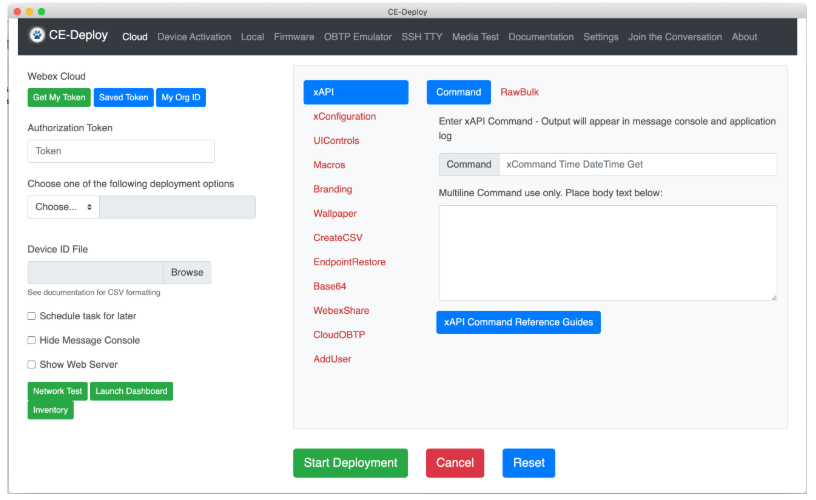
CE-Deploy in the version 6 era. Screenshot from my January 2021 post about CE-Deploy 6.1.0. This is an early chapter in the project’s evolution, rather than its first release.
The January 2021 post shows how much the scope had grown. Engineers could enter xAPI commands in their familiar form and deploy them across endpoints without writing a separate script. Work could be scheduled for a maintenance window, with a report delivered through Webex afterward.
I often describe the legacy application as ugly but effective. Looking at this screenshot, I think that is fair. It got useful work done, even if the interface was never going to win a beauty contest.
The screenshot still makes that approach easy to recognize. Deployment choices sit beside the command editor. Scheduling is a checkbox. The aim was to put a useful operation within reach without requiring the operator to build all the plumbing first.
Later that year, my training post on xAPI deployment and Macro Factory highlighted another shift. Getting a macro onto a device was only part of the job. Managing the macro footprint across endpoints needed its own tools and visibility.
Where CE-Deploy is now
Today, CE-Deploy covers a broader set of fleet workflows: deployment, inventory, configuration auditing, macro drift detection, scheduling, reusable templates, and development with xAPI Forge. Cloud and on-premises operations remain central to the application. The feature overview gives a fuller picture.
The recent releases also show where the work is going. Partner Plus brings delegated customer management into familiar workflows. Browser-based Webex sign-in supports enterprise SSO and passkeys. The September PhonePilot redesign separates Control and Diagnose workspaces and adds richer diagnostics and evidence collection. These changes are documented in the release history.
The application now has more responsibility around each action. Selecting the right organization, keeping customer contexts separate, showing partial failures, and distinguishing stale information from a confirmed result all matter. An operator needs to understand what happened well enough to decide what to do next.
A desktop toolset that supports the partner business
Partners put a great deal of work into their platforms, managed services, and customer relationships. I want CE-Deploy to augment that business by giving their engineers useful tools for deployment, validation, and troubleshooting. The partner brings the service, expertise, and ongoing relationship with the customer. CE-Deploy helps with the hands-on work that supports it.
In my experience, much of the software focus has moved toward web administration portals. Those portals have an important role, and there is still room for a capable desktop application alongside them. An engineer working with cloud and on-premises devices needs practical ways to inspect a problem, prepare a change, and carry it out safely. That is the space CE-Deploy serves.
Partner Plus follows that same thinking: make the desktop toolset more useful to engineers working across customer organizations. It is not an attempt to take over the partner’s platform or compete for their customer business. I want partners to read this and see something they can put to work within the services they already deliver.
A safer deployment starts before you press Deploy
A major part of the new UI is helping people make a safe deployment. As CE-Deploy becomes more capable, protecting the environment you are deploying into has to be part of the workflow.
That means inspecting macros for unsafe commands and checking their JavaScript through linting before they reach a device. A macro with a dangerous operation or failing JavaScript checks should not simply sail through deployment because someone selected a file and clicked a button. The operator needs to see what is wrong and address it before rolling it out across a fleet.
Microsoft Teams Rooms (MTR) compatibility is another important part of that work. A command or macro that is appropriate for one endpoint may not be appropriate for a device running in MTR mode. Bringing compatibility checks and pre-flight feedback into the deployment process helps people understand those differences before making a change.
This is substantial work, and it matters just as much as the features people see in a demo. A deployment tool should help protect the user’s deployment, including when the problem is in the content being deployed. Getting something to every device quickly is only useful if it belongs on those devices in the first place.
How improvements shape what comes next
The direction I want to keep building toward follows from those lessons: make repeated work easier, make results clearer, and make the engineering tasks within larger workflows easier to trust.
Automation is an area I want to develop further, with CE-Deploy contributing a useful toolset within a broader automation process. It does not need to own that process from end to end. The goal is to help partners and engineers bring safer, repeatable device operations into their own workflows, alongside the platforms and tools they choose.
One future safety direction I want to pursue is making sure a factory-reset command can never enter an automation process. An unattended workflow needs firm boundaries around destructive actions. For something that could wipe a device, I want to move beyond a warning that can be clicked through and prevent it from becoming an automated step at all. That is a goal for future safeguards, not a claim that every path already enforces it today.
A reliable deployment can become a reusable template. A well-understood sequence can become a repeatable part of a wider workflow. Useful history and diagnostics can reduce the guesswork when something needs attention. These are ways to make the toolset more useful within someone else’s operation while keeping its engineering focus.
That also means some of the most valuable work is easy to miss in a screenshot. Better validation, safer handling of credentials, clearer failure states, and more dependable updates may not look like headline features. They are essential when people rely on the application to make changes across a fleet.
This is the direction of travel, rather than a list of promised release dates. I want feedback from real deployments to keep shaping the work, just as it did after those first macro-deployment builds.
The version 6 screenshot is a useful reminder of how far the project has come. It also reminds me to keep the original problem in view: there is an engineer trying to get a job done, often as part of a partner delivering a service to a customer. CE-Deploy should make that job easier and help that partner succeed.
Thanks to everyone who has tried CE-Deploy, reported a problem, asked for a feature, or shared how they use it. Keep those conversations going.
— Chris / VoIPNorm
Keep the conversation going.
Have a CE-Deploy memory or a workflow to share?
React or discuss on GitHub ↗